Due to the many requests you, my dear friends, have sent through the support section about adding a logout button to the app, I decided to teach you how to do it as a trick. So if you've been waiting for the logout button tutorial, I invite you to join me on the ServerNet blog.
Of course, don't forget this point, and my colleagues in the support section have also mentioned that according to standards, this button is better not to be in app design. In general, mobile operating systems are designed in such a way that when a user presses the back button and exits the app, the OS keeps the app alive in its memory until the number of apps increases and that app gets closed. This helps to display the app faster the next time the user enters it.
If the app is still in memory, it will be displayed faster, but the logout button causes the app to be closed right from the first step, or in other words, we kill the app with our own hands and don't let the operating system do its job.
But sometimes we might want something and not care about standards, so I don't care either and I'll start the logout button tutorial.
Tutorial: Adding a Logout Button to the App
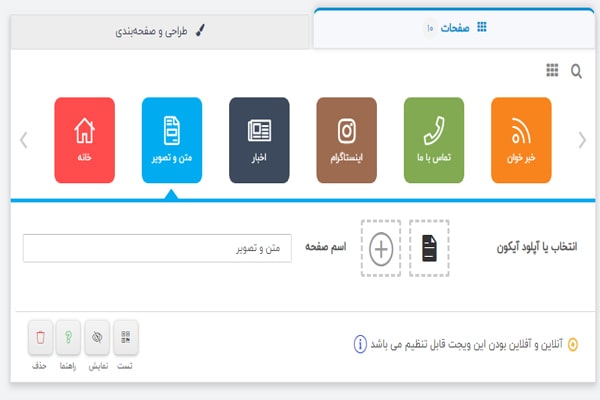
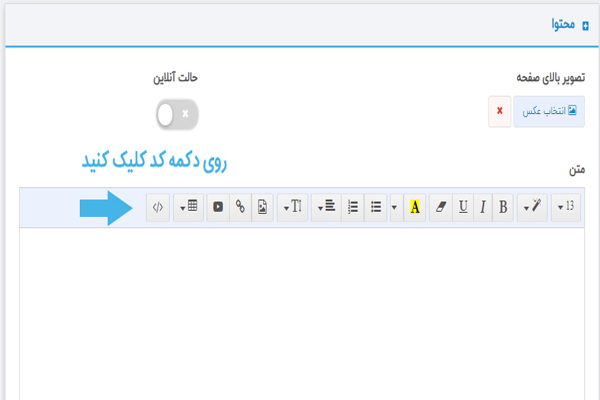
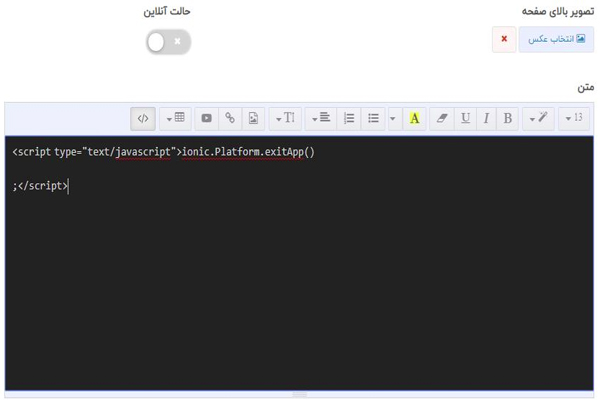
Well, for this, we need to add a text and image widget to the app and name it, for example, "Logout". Then, place the code below in the code section of this page, as you can see in the figure.|
1
2
3 |
<script type="text/javascript">ionic.Platform.exitApp();</script> |
 Tutorial: Adding a Logout Button to the App
 Adding a Logout Button to the App
 Tutorial: Adding a Logout Button to the App
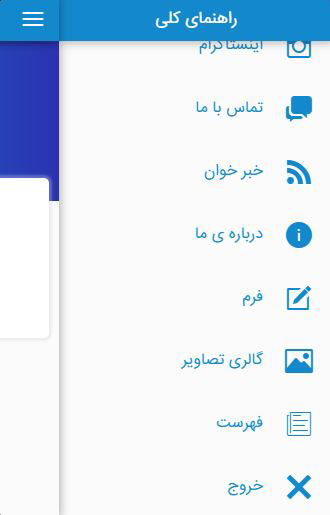
You can remove this page from the home page and only display it in the menu. Or it can be in both places. You can also move it to the end of your pages so it appears as the last item in the menu or home.
Well, after you've done all these steps, placed it the way you wanted, and assigned the desired icon to it, download and install the application and test this button.
Keep in mind that this trick only works in Android applications.
I hope I've written the logout button tutorial in a way that you understand, but if you have any questions, you can ask my colleagues in the support section. So if you were waiting for this tutorial, apply it to your app right now.
Comments 0
No comments yet — be the first!